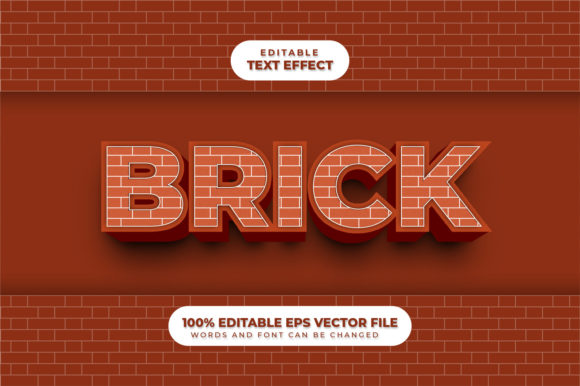
Brick 3D Text Effect with Editable Text
Imagine typing a word—like “OPEN” or “SALE”—and watching it instantly transform into bold, textured brick letters that look like they’re built from real masonry. That’s the core magic of the Brick 3D Text Effect, Editable Text: a design tool that delivers realistic depth, surface detail, and structural weight to your words—while keeping the text fully editable at every step.
What It Is (and Why It Feels Different)
This isn’t just a static image or a flattened graphic. The Brick 3D Text Effect, Editable Text is typically implemented as a layered template—often in tools like Adobe Photoshop, Figma, or web-based editors—that uses smart objects, layer styles, or CSS variables to simulate brickwork: mortar lines, subtle color variation between bricks, slight beveling, and directional lighting that casts natural-looking shadows.
The “editable” part is key. You don’t need to redraw or re-rasterize when you change the wording. Swap “WELCOME” for “GRAND OPENING”, adjust font size, or switch to all caps—and the brick texture, depth, and perspective update automatically. No manual touch-ups. No lost quality.
Where It Fits Into Real Projects
People reach for this effect when they want impact without complexity—especially when time, technical skill, or design resources are limited. A small café owner adds “FRESH COFFEE” in brick 3D text to their Instagram Story. A teacher creates a classroom banner reading “READING ZONE” with tactile visual appeal. A freelance designer drops the same editable file into three client presentations—changing only the headline each time.
It works especially well where authenticity and grounded energy matter: local businesses, craft brands, education materials, event signage, podcast cover art, or even landing page hero sections. Unlike glossy metallic or neon effects, brick conveys warmth, durability, and approachability—qualities that resonate across age groups and industries.
Simple Uses You Can Try Today
- Small business signage: Use “NOW HIRING” on a storefront mockup—swap fonts to match your brand, then export as PNG for social posts or print-ready PDFs.
- Educational posters: Turn vocabulary words like “HABITAT” or “FRACTION” into tactile learning visuals—students remember better when text feels dimensional.
- Email headers or newsletter banners: Drop an editable brick-text headline over a neutral background. Change the message weekly without redesigning the whole layout.
- YouTube thumbnails: Stand out with bold, legible titles—even at small sizes—thanks to high-contrast mortar lines and clear depth cues.
What Makes It Practical (Not Just Pretty)
Unlike many 3D text generators that lock you into fixed renders or require 3D software knowledge, Brick 3D Text Effect, Editable Text prioritizes workflow efficiency. Most versions let you control key variables with sliders or dropdowns: brick size, mortar width, light angle, shadow intensity, and surface roughness. Some even support color themes—warm reds, weathered greys, or custom palettes—to match your logo or seasonal campaign.
Because it stays vector- or layer-based, scaling is lossless. Print a 24”×36” poster or shrink it to a mobile app icon—the edges stay crisp, and the brick pattern remains consistent. And since no external plugins or subscriptions are needed for basic use, it lowers the barrier for educators, solopreneurs, or anyone managing multiple projects solo.
Things to Keep in Mind Before You Start
First—check compatibility. Not all templates work the same way across platforms. A Photoshop .PSD with smart object layers won’t open natively in Canva, but many creators now offer cross-platform alternatives (like Figma files or SVG-based web tools) with similar flexibility.
Second—consider context. Brick texture adds visual weight, so avoid pairing it with overly busy backgrounds or low-contrast colors. A light brick effect on white may disappear; dark mortar on black can vanish entirely. Test readability early, especially for accessibility or outdoor signage.
Third—mind the message. This effect shines with short, strong words or phrases (“YES”, “NEW”, “LOCAL”, “BREW”). Long sentences or fine print lose clarity—brick patterns introduce visual noise, not refinement. When in doubt, keep it under five words.
Lastly—think about tone. Brick implies solidity and tradition. That’s perfect for a heritage bakery or community center—but maybe less fitting for a futuristic tech startup or minimalist skincare line. Let the effect support your voice, not override it.
How It Supports Learning and Growth
For beginners, working with Brick 3D Text Effect, Editable Text is a gentle entry point into layer-based design thinking. You begin to notice how lighting direction affects perception, how spacing influences hierarchy, and why contrast matters for accessibility. There’s no pressure to build from scratch—you learn by adjusting, observing, and iterating.
For professionals, it’s a reusable asset—not just a one-off graphic. Save variations as branded components: “CTA Brick”, “Headline Brick”, “Event Brick”. Reuse them across websites, pitch decks, merch mockups, and social calendars. Consistency builds recognition; efficiency builds capacity.
And for educators or workshop leaders, it’s a tangible way to talk about typography, texture, and visual metaphor—without needing a design degree. Ask students: *Why does “STRENGTH” feel different in brick versus bubble letters? How would changing the mortar color shift the mood?*
A Final Thought
The Brick 3D Text Effect, Editable Text endures because it balances craft and convenience. It doesn’t ask you to master 3D modeling or memorize complex shortcuts. Instead, it gives you immediate, professional-grade presence—with room to experiment, adapt, and stay human in your communication. Whether you're announcing a pop-up shop, designing a student worksheet, or refreshing your portfolio homepage, it offers grounded visual energy that invites attention—and holds it.
You don’t need perfection to start. Just a word, a purpose, and a few seconds to watch it rise—brick by brick.