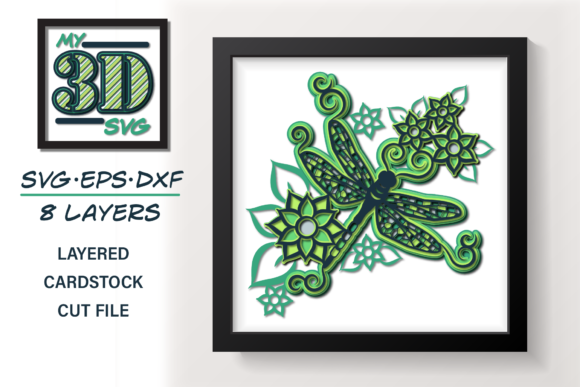
3D Dragonfly - Layered Dragonfly: A Practical Asset for Designers and Communicators
When visual clarity and dimensional nuance matter—whether in a pitch deck, educational module, product prototype, or interactive exhibit—the 3D Dragonfly - Layered Dragonfly stands out not as a novelty, but as a well-structured, production-ready asset. It’s not a generic insect model rendered in basic geometry; it’s a purpose-built layered 3D object designed with intentionality around segmentation, material fidelity, and editable depth. That distinction matters most when time, consistency, and contextual integration are constraints—not just creative preferences.
What Sets This Model Apart from Standard 3D Insects?
The 3D Dragonfly - Layered Dragonfly is built with discrete, logically grouped layers: wings (front and rear, individually separable), thorax, abdomen, head, and compound eyes—each assigned distinct materials and UV layouts. Unlike monolithic models where editing one part forces reworking the whole mesh, this version supports selective visibility toggling, color overrides, lighting adjustments per segment, and even independent animation rigging. Its topology avoids unnecessary polygons while preserving organic curvature—especially in wing veination and body tapering—making it responsive in both real-time engines (like Unity or Unreal) and high-fidelity renderers (such as Blender Cycles or KeyShot).
It ships in multiple formats: FBX (with embedded textures), OBJ (clean mesh + MTL), and GLB (optimized for web use). All versions retain layer integrity—no “flattening” occurs across exports. Texture maps include diffuse, roughness, and normal channels at 2K resolution, with optional 4K variants available in premium bundles. The model scales predictably: at 1:1 real-world ratio, the full dragonfly measures approximately 78 mm in length—ideal for scientific illustration, scale comparisons, or AR overlays requiring metric accuracy.
Real-World Use Cases and Workflow Integration
In practice, the 3D Dragonfly - Layered Dragonfly performs consistently across three common professional scenarios:
- Educational publishing: Biology instructors embed the model into interactive PDFs or LMS modules. Because wings and body segments are separate, learners can toggle anatomical labels on/off or isolate motion paths—e.g., simulating wingbeat frequency by rotating only the forewings at 30 Hz while keeping the abdomen static.
- Product prototyping: Industrial designers use the thorax and wing geometry as reference shapes when developing micro-drones or biomimetic sensors. Its clean edge loops and uniform quad density simplify Boolean operations and subdivision surface refinement during iterative modeling.
- Digital storytelling: Marketing teams integrate it into branded explainers—say, illustrating airflow dynamics in a sustainability report. With layered transparency controls, they fade wing layers sequentially to demonstrate laminar vs. turbulent flow zones without needing custom shader work.
One freelance UX designer reported cutting nearly four hours off a client’s “bio-inspired interface” project timeline by using the 3D Dragonfly - Layered Dragonfly as a base for animated transitions—replacing a manually rigged alternative that required texture remapping and joint weighting each time a new wing angle was added.
Quality, Usability, and Technical Reliability
Quality is evident in subtle but consequential details: wing membranes use alpha-transparency rather than opaque white fill, enabling realistic light diffusion; the compound eyes feature subtle subsurface scattering hints baked into the roughness map; and all normals face outward with zero flipped faces—verified across import tests in Maya, Cinema 4D, and Blender 3.6+. No post-import cleanup is needed for standard rendering pipelines.
Usability hinges on organization—not just aesthetics. Each layer carries semantic naming (wing_fore_left, abdomen_segment_3) rather than generic Mesh001 labels. Materials follow PBR conventions, so metallic/roughness values align with physical expectations (e.g., chitinous thorax = low metallic, medium roughness; wing membrane = zero metallic, high roughness). Consistency extends to scale: units are metric by default, with no arbitrary scaling offsets—a small point that prevents cascading errors when compositing with other assets.
Reliability shows up in long-term projects. A university research lab has used the same 3D Dragonfly - Layered Dragonfly file across three grant cycles (2021–2024), updating only textures and shaders as rendering software evolved—never the core geometry. That longevity reflects deliberate authoring, not accidental compatibility.
Who Benefits Most—and When It Might Not Fit
The 3D Dragonfly - Layered Dragonfly serves professionals who need precision, modularity, and repeatability—not just visual appeal. Educators building reusable STEM assets, technical illustrators supporting patent filings, AR developers targeting WebXR deployment, and product designers exploring biomimicry will find its structure directly supportive of their goals.
It’s less suited for users seeking stylized, cartoonish, or highly abstracted interpretations. There’s no built-in cartoon-shader preset, no exaggerated proportions, and no simplified topology for ultra-low-poly mobile use (though decimation tools reduce it to ~12k tris without visible artifacting). If your workflow depends on procedural generation—say, randomizing wing patterns via node-based systems—you’ll still need to extend the base model with additional tooling. And while the layered approach aids editing, it does require familiarity with layer management in your DCC; beginners may initially overlook how visibility states affect render passes or export scope.
Practical Recommendations for Getting Started
Start by importing the GLB version into a web-based viewer like glTF Viewer to assess lighting response and layer behavior before committing to heavier software. For Blender users, enable the “Import FBX” add-on and check “Preserve Edge Direction” to maintain sharp wing leading edges during subdivision.
If you’re integrating into Figma or Adobe XD via Spline or Vectary, use the GLB export—but disable shadows in the viewer settings first to avoid unintended occlusion artifacts in flat compositions. For print-based outputs, render orthographic front/side/top views at 300 DPI using the layered visibility to generate annotated diagrams without manual masking.
Finally, treat the 3D Dragonfly - Layered Dragonfly as a foundation—not a final deliverable. Its value multiplies when combined with domain-specific data: overlay thermal gradients onto the abdomen layer, animate wing flex based on wind tunnel measurements, or map genetic sequence data to thoracic segmentation. That flexibility isn’t assumed—it’s engineered in.
For teams evaluating visual assets against criteria like reuse potential, cross-platform stability, and documentation clarity, the 3D Dragonfly - Layered Dragonfly delivers measurable efficiency gains—not through flash, but through thoughtful structure and quiet reliability.