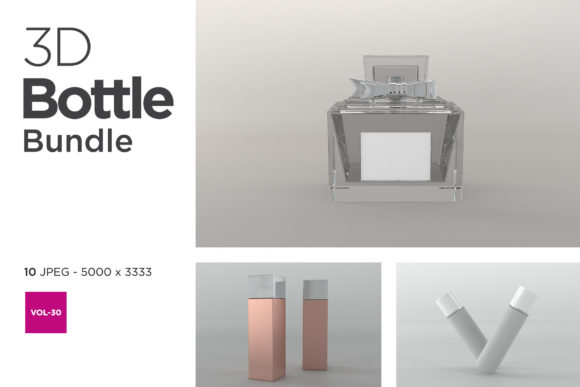
3D Bottle Mockup Bundle Vol-30: A Practical Evaluation for Designers and Marketers
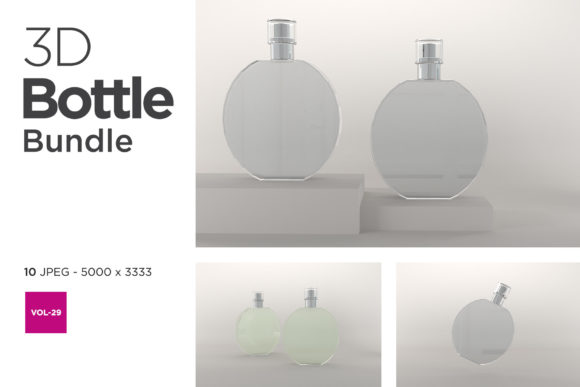
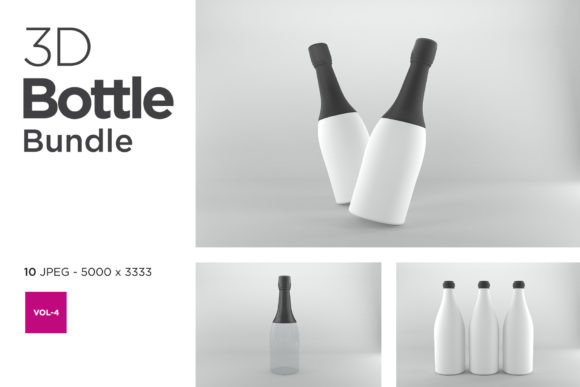
3D Bottle Mockup Bundle Vol-30 is a curated collection of high-fidelity, layered PSD and smart-object-enabled mockups designed specifically for presenting beverage, cosmetic, pharmaceutical, and personal care packaging in realistic 3D contexts. Unlike generic or single-angle templates, this bundle emphasizes environmental integration—showing bottles on textured surfaces, under natural lighting, with accurate reflections and depth-of-field effects. It includes over 45 unique scenes across multiple bottle shapes (sleek glass, matte plastic, amber apothecary, sporty PET), orientations (front, angled, overhead, floating), and background types (studio white, marble countertop, wooden shelf, outdoor patio). All files are built for Adobe Photoshop CC 2019 or later and support non-destructive editing via Smart Objects.
How 3D Bottle Mockup Bundle Vol-30 Differs From Broader Mockup Categories
Most designers encounter three general categories of bottle presentation resources: basic flat PSD mockups, fully editable 3D modeling files (like Blender or Cinema 4D scenes), and parametric online mockup generators. 3D Bottle Mockup Bundle Vol-30 sits between the first and second—offering more realism and flexibility than static PSDs, but without the steep learning curve or time investment of building from scratch in 3D software.
Compared to flat mockups, Vol-30 provides dynamic lighting and perspective that respond realistically to label placement—shadows shift, highlights follow curvature, and transparency renders accurately on glass variants. Compared to full 3D models, it doesn’t require rigging, UV unwrapping, or material mapping. You drop your label design into a Smart Object layer, and the mockup updates automatically while preserving lighting integrity and surface texture fidelity.
This middle-ground approach makes Vol-30 especially practical for teams managing frequent product iterations—say, a cosmetics brand launching seasonal scents or a supplement startup testing label variants across SKUs. You’re not modeling each bottle anew; you’re reusing consistent, photorealistic contexts to maintain visual cohesion across campaigns.
Strengths That Support Real-World Workflows
Three aspects make 3D Bottle Mockup Bundle Vol-30 stand out in day-to-day use:
- Consistent lighting logic: Each scene uses physically plausible light sources—directional key lights, subtle fill, and ambient occlusion—so labels placed across different bottles retain comparable contrast and legibility. This matters when compiling lookbooks or pitch decks where visual parity builds credibility.
- Surface-aware material layers: Glass, frosted plastic, and matte ceramic each have dedicated texture overlays and reflection masks. When you edit your label, the underlying material behavior remains intact—no manual blending required to simulate how ink sits on translucent vs. opaque substrates.
- Scalable context variety: Rather than repeating one studio setup, Vol-30 spreads its assets across environments with distinct tonal palettes and spatial cues—e.g., a minimalist white backdrop for clinical or premium positioning versus a sunlit kitchen counter for wellness or artisanal messaging. That helps avoid visual fatigue in multi-product presentations.
Tradeoffs and Situational Limitations
No resource fits every need—and understanding where 3D Bottle Mockup Bundle Vol-30 falls short is as important as knowing where it excels.
It does not support animation or interactive rotation. If your project requires 360° spin views for e-commerce or AR previews, you’ll need motion-capable tools like Keyshot, Dimension, or specialized WebGL platforms. Similarly, Vol-30 isn’t built for batch automation: applying labels across dozens of bottles still requires individual Smart Object updates in Photoshop—not script-driven bulk processing.
Also, while the bundle covers common bottle forms (500ml, 30ml dropper, 250ml spray), it doesn’t include highly custom geometries—think asymmetrical perfume flacons, collapsible tubes, or dual-chamber dispensers. Those demand bespoke modeling or custom mockup development.
Finally, color accuracy depends on your monitor calibration and working space settings (sRGB vs. Adobe RGB). The mockups render well on standard displays, but for print-critical color matching—especially for Pantone-referenced packaging—you’ll still need physical proofs or calibrated soft-proofing workflows alongside Vol-30 outputs.
When 3D Bottle Mockup Bundle Vol-30 Fits—And When It Doesn’t
Vol-30 works best when your goals center on speed, consistency, and presentation quality—not technical experimentation. Consider it ideal if you:
- Produce 3–10 label variations per product launch and need cohesive visuals for internal review, retailer submissions, or crowdfunding pages;
- Work with agencies or freelancers who use Photoshop as their primary delivery tool (no need to onboard new software or train on 3D pipelines);
- Value realistic environmental storytelling—e.g., showing a cold-pressed juice bottle beside fresh fruit, or a skincare serum on a bathroom vanity—to strengthen brand narrative in digital ads or social posts.
Conversely, look elsewhere if you routinely need:
- Dynamic labeling: Where text or graphics must wrap around complex curves with variable distortion (e.g., embossed lettering on a ribbed glass surface);
- Cross-platform output: Where final assets must export natively to Figma, Sketch, or web-based preview tools without Photoshop dependency;
- Real-time collaboration: Where multiple stakeholders need to adjust lighting, angle, or background simultaneously—something cloud-native mockup services handle more fluidly than layered PSDs.
Practical Comparison: One Use Case, Two Approaches
Imagine you’re preparing visuals for a new line of organic hand soap. You have three label designs and need to show them on 200ml amber glass bottles across four contexts: e-commerce thumbnail, Instagram carousel, retail shelf mockup, and PDF spec sheet.
With 3D Bottle Mockup Bundle Vol-30, you’d open four relevant scenes (e.g., “Amber Bottle on Slate,” “Floating Bottle Studio,” “Shelf Context – Natural Light,” “Overhead Flat Lay”), replace the Smart Object layer in each, and export PNGs at required dimensions. Total time: ~25 minutes for all 12 images—assuming familiarity with Photoshop layers.
Using a free online generator, you might upload each label once and select presets—but often face limits on resolution, background control, or shadow fidelity. Output may lack the tactile nuance needed for premium positioning, and you can’t tweak light direction or surface grain without downloading and editing externally.
Building the same scenes in Blender would give total control—but easily consume 8+ hours just to match the lighting and material accuracy already baked into Vol-30. For a one-off campaign, that ROI rarely justifies the effort.
Making the Call: Fit Over Features
The value of 3D Bottle Mockup Bundle Vol-30 isn’t in having “the most” options—it’s in having the right ones, reliably, without friction. It assumes you already work in Photoshop and prioritize output quality and contextual relevance over novelty or automation. It’s built for clarity, not complexity.
If your workflow involves tight deadlines, collaborative handoffs, and audience-facing deliverables where realism builds trust—Vol-30 reduces guesswork and iteration cycles. But if your projects demand technical adaptability, cross-tool interoperability, or experimental presentation formats, investing time in learning a broader 3D toolkit—or partnering with a specialist—may serve you better long term.
Ultimately, choosing among mockup resources comes down to alignment: Does this tool simplify what you do often—or add layers to what you do rarely? For many designers, marketers, and small-brand founders, 3D Bottle Mockup Bundle Vol-30 simplifies the former without compromising on the latter.